
The Real Problem Service Businesses Don’t See Yet
"Email marketing" sounds fine when you’re small.
A few clients. A few jobs. A few well-timed reminders. Jobber does its thing, and maybe you shoot off a campaign every quarter or so.
But here’s what actually happens as you grow:
- One tech leaves, and nobody follows up on the last 20 estimates.
- A client gets three reminders for a job that was canceled last month.
- Your "newsletter" goes to every customer—from snow removal to landscaping—regardless of season.
Most service businesses think the problem is not enough email. It's the opposite.
It’s inconsistent follow-ups, missed rebooking windows, and communication that depends entirely on memory (or who last touched the account).
You’re relying on:
- Jobber notifications
- Manual reminders
- One-off emails
These work… until they don’t. Usually right around:
- 200+ active customers
- 3+ people touching accounts
- More than one type of service
What’s really breaking is the lifecycle. Customers aren’t getting what they need, when they need it. And your team is too busy guessing what’s next.
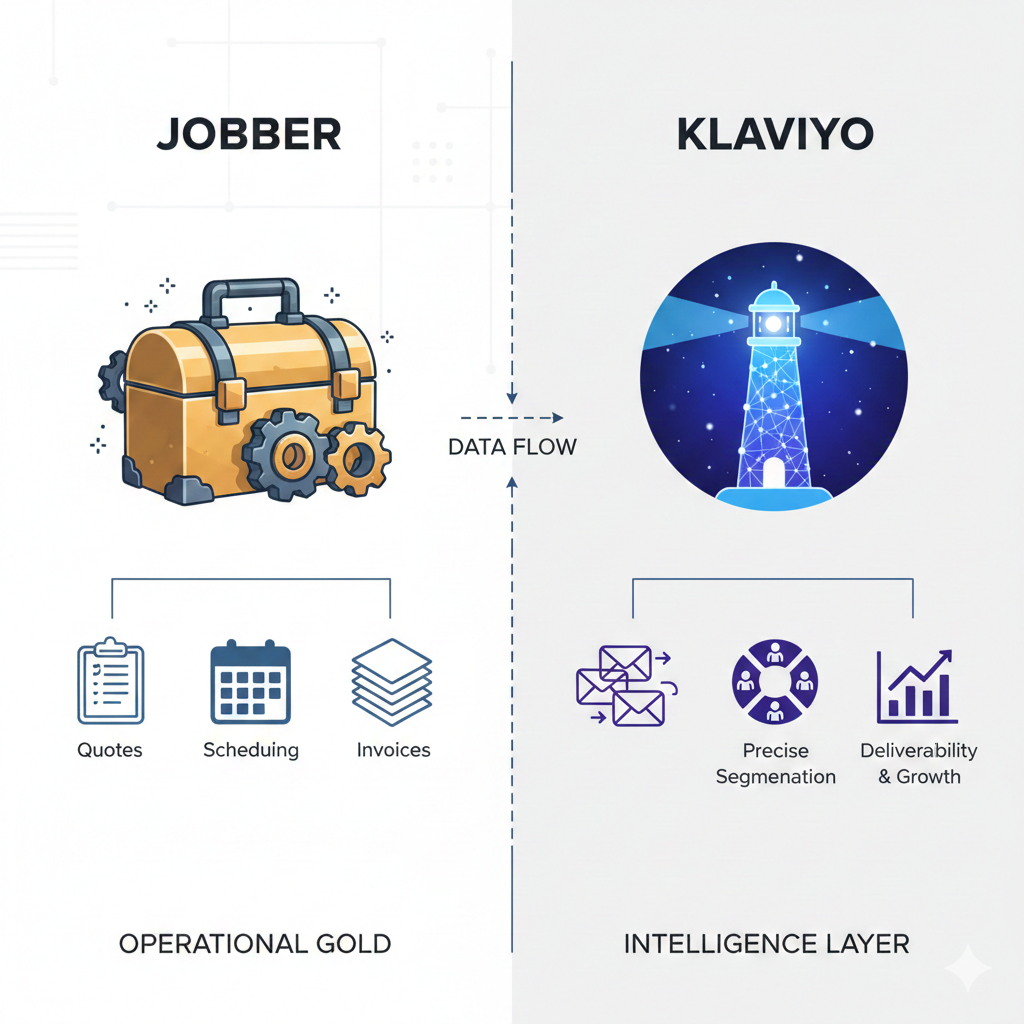
Jobber Is Operational Gold — But It Stops at the Inbox
Let’s be clear: Jobber is excellent at what it does.
- Quotes
- Jobs
- Scheduling
- Invoices
It’s the operational source of truth. The backbone of your fieldwork. The place everyone checks to see what’s happening today.
But Jobber was never designed to manage long-term relationships. It doesn’t track lifecycle stages, customer intent, or engagement trends.
It doesn’t:
- Know when a quote should trigger a re-engagement
- Understand if a customer’s job history suggests upsell timing
- Identify gaps in service cadence
Which means even with great operational data, there’s no intelligence layer turning it into revenue-generating communication.
This is where service businesses hit an invisible ceiling.
You’ve got the work. You just don’t have the system to turn that work into repeatable growth.
Related: Why Jobber’s Native Emails Don’t Scale
Operational Gold vs. Marketing Brain.png
Why Klaviyo Becomes Necessary (But Not Sufficient on Its Own)
Klaviyo gives you what Jobber can’t:
- Multi-touch automation
- Precise segmentation
- Deliverability you can trust
It’s an execution powerhouse. Built for lifecycle marketing.
But here’s the catch: it doesn’t know your customer context unless you feed it properly.
If you plug in just email addresses or basic tags, Klaviyo becomes another tool that:
- Sends irrelevant campaigns
- Misses revenue triggers
- Can’t tie results back to jobs
It’s not Klaviyo’s fault. It was built to react to signals.
The problem is your signals are still buried in Jobber.
Related: What You Can Automate When Jobber and Klaviyo Are Properly Connected
The Missing Layer: Operational Data → Lifecycle Logic
Here’s where most “integrations” fall short.
They move contact info. Maybe sync a job status. But they don’t translate operational events into lifecycle triggers.
The difference?
- A quote is a document. But a quote approved event is a signal of buyer intent.
- A job completed status is a checkbox. But as a trigger, it’s your perfect upsell or review prompt.
- An invoice paid record isn’t just accounting. It’s a signal of satisfaction and readiness for retention flows.
These are the signals that should drive:
- Nurture sequences
- Re-engagement logic
- Cross-sell recommendations
- Win-back campaigns
With the right connector in place, these operational moments become the heart of your lifecycle strategy.
Related: The Most Overlooked Revenue Trigger in Jobber: Job Completion
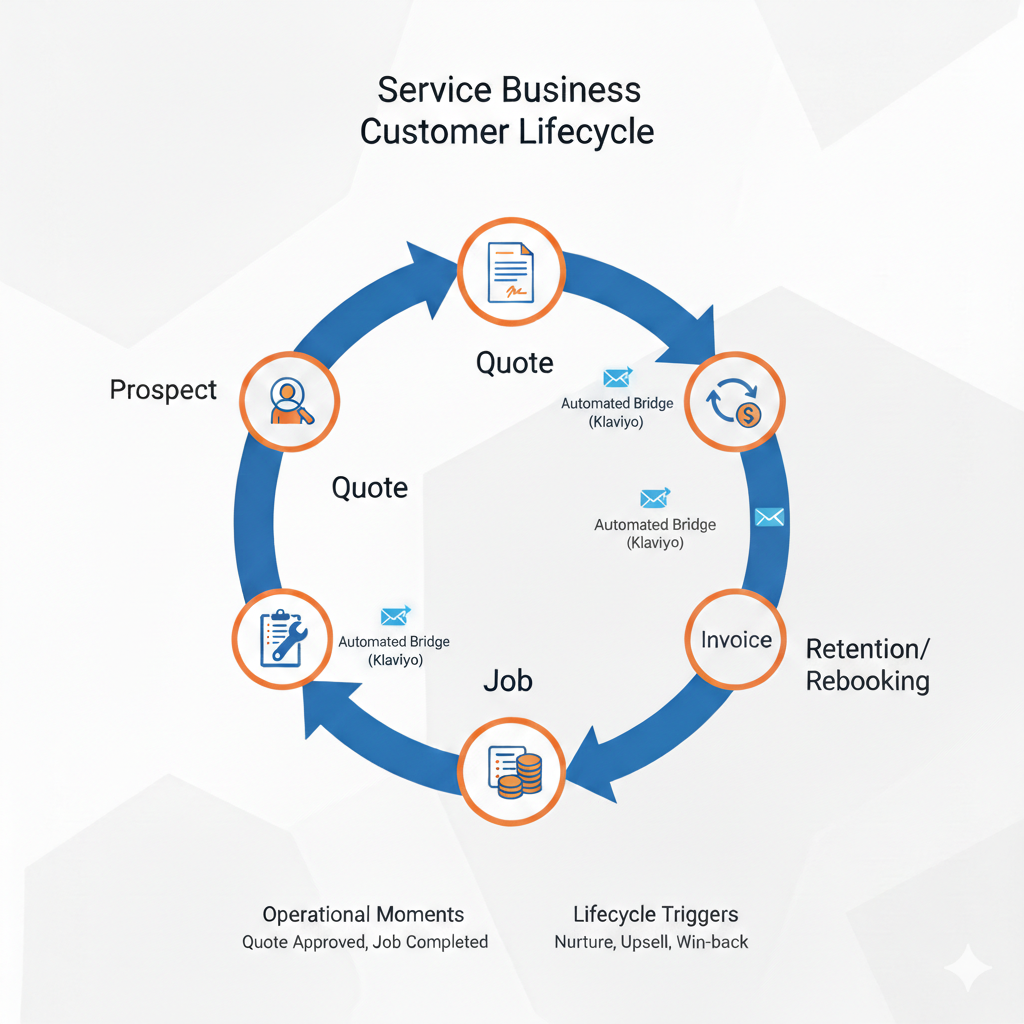
From Quote to Invoice: The Service Business Lifecycle
Most service teams think in bookings.
Marketing teams think in email sends.
But what you really need to think in is lifecycle transitions.
Here’s what that looks like:
- Prospect → Quote: First signal of interest. Opportunity to nurture or convert.
- Quote → Job: Where intent becomes commitment. Timing matters here.
- Job → Invoice: Signals fulfillment. Opportunity to deepen trust.
- Invoice → Retention/Rebooking: Where long-term value is won or lost.
Every one of these transitions has friction. Delay. Drop-off.
And every one is a chance to insert timely, relevant communication.
Most revenue leakage happens in these gaps—not because your services are bad, but because the system to follow up is manual or missing entirely.
Related: From Quote to Invoice: Mapping the Jobber Customer Lifecycle
Where Automated Revenue Actually Comes From
It’s not from loud, mass-blasted discounts.
It’s from:
- Post-job follow-ups: Two days after completion, when satisfaction is fresh.
- Maintenance reminders: Based on specific service types (e.g., 6-month HVAC checks).
- Seasonal rebooking: Targeted by region and past service cadence.
- Service-type upsells: Customers who booked X tend to need Y within Z months.
- Review & referral prompts: Timed when NPS likelihood is highest.
This is where lifecycle intelligence shines.
Because you're not blasting.
You're sequencing.
You're aligning communication with real operational moments—automatically.
When Things Go Wrong: Bad Data, Bad Automation
Automating the wrong thing isn’t efficient. It’s expensive.
We’ve seen:
- Duplicate profiles: One from Jobber, another from a webform, causing overlap.
- Broken history chains: Quotes that don’t connect to jobs, jobs not tied to invoices.
- Over-messaging: A client finishes a service and immediately gets hit with five irrelevant flows.
- Stale segments: People flagged as "active" despite months of inactivity.
These aren’t edge cases. They’re common when:
- You rely on native integrations
- Your data model doesn’t respect lifecycle logic
- You try to scale automations without proper QA
Unified Customer Profiles for Service Businesses
Here’s the next level: moving from activity-based marketing to intelligence-based systems.
What does that mean?
- One customer might span multiple properties, family members, or job types
- Their lifecycle isn’t a straight line—it loops across seasons, services, and teams
- Their value isn’t one invoice, it’s the pattern across time
A unified profile recognizes this:
- It connects dots between jobs, locations, and repeat behavior
- It scores engagement based on more than clicks
- It gives your team—and your automations—a true picture of who the customer is
What This Unlocks Long-Term
Get this right, and the benefits compound.
You go from:
- Manual check-ins → Timely, contextual follow-ups
- Guessing schedules → Data-driven rebooking cadences
- One-size messaging → Personalized, relevant comms
What starts as a few automated flows becomes a true lifecycle machine:
- Less admin overhead
- More consistent revenue
- Better customer experience
- Scalable systems that don’t break under growth
You’re not just sending emails.
You’re building a business that communicates like it understands its customers.
Lifecycle Automation Isn’t a Feature — It’s an Operating Model
For service businesses, growth doesn’t come from sending more emails.
It comes from aligning operational reality with lifecycle communication.
Your data is already telling a story.
Now it’s time to send the right message at the right time—without your team having to remember.