
A 14-day rescue plan for email/SMS is what you need when your ESP or SMS vendor sunsets a feature, pivots the product, jacks pricing, or quietly changes policy—and your lifecycle program suddenly has an expiration date.
This is a BOFU playbook for teams already forced into motion. The promise is simple: you can exit or retool fast without detonating deliverability, consent, or revenue flows.
(Internal link: Warehouse-Native Lifecycle Marketing (2025 Guide): From Data to Revenue Without Replatforming — the “why this works” foundation when vendors shift.)
The Situation Nobody Plans For (But Everyone Gets Eventually)
There are four versions of the same fire:
- Sunset: The vendor kills a feature you rely on (or your plan tier) and gives you a deadline.
- Pivot: The product shifts direction (often “enterprise-first”), and SMB/mid-market use cases start breaking.
- Price shock: Your bill doubles because “profiles,” “events,” or “messages” are suddenly counted differently.
- Policy change: Import rules, consent enforcement, throttling, or compliance defaults change—and your sends get blocked or limited.
The trap is thinking you’re “moving messages.”
You’re not.
You’re moving state:
- consent (email + SMS, often stored differently per tool),
- suppressions (unsubs, bounces, complaints, manual suppressions),
- identity (how a person is keyed across systems),
- and “event truth” (what actually counts as abandoned cart, purchase, browse, etc.).
If you migrate data but lose state, you’ll ship something that “works” in the UI… and fails in the inbox.
What “Success” Looks Like in 14 Days
Here’s the Day-14 definition of done:
- Core email + SMS sending is live
- Suppressions + consent are mapped and verified
- Top revenue journeys are rebuilt and firing correctly
- No inbox placement cliff, no complaint spike
- Reporting stays trustworthy (your source-of-truth didn’t get replaced by a new vendor’s UI logic)
Notice what’s missing: “We rebuilt everything.”
In forced windows, minimum viable lifecycle beats “perfect rebuild.”
The 14-Day Rescue Plan (Day-by-Day, Owner-by-Owner)
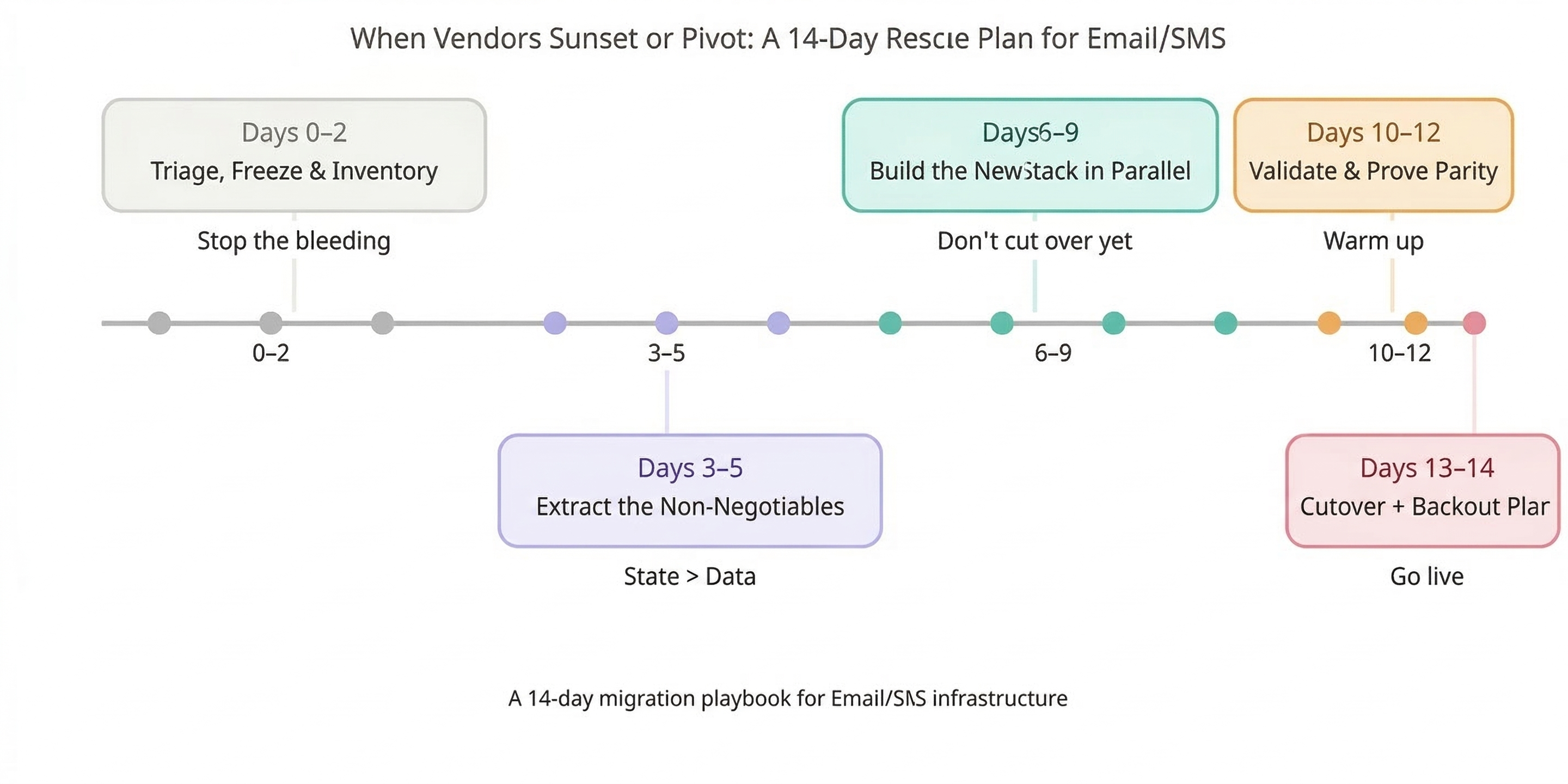
Days 0–2 — Triage, Freeze, and Inventory (Stop the Bleeding)
Goal: prevent bad sends and stop last-minute changes from creating mystery bugs.
Freeze rules
- Pause: non-critical promos, experiments, low-performing flows, “nice-to-have” segments.
- Keep running: transactional/critical (receipts, password resets, service notices), and only the lifecycle flows that protect revenue and won’t be rebuilt in time.
Inventory checklist (assign owners)
- Lifecycle lead: list every journey/flow and rank by:
- revenue impact (last 30/60/90 days),
- risk (deliverability/compliance blast radius),
- rebuild complexity.
- Creative lead: template inventory:
- master templates,
- modules/partials,
- brand tokens (fonts/colors),
- dynamic blocks rules.
- Data/engineering: list data sources feeding journeys:
- ecommerce platform,
- website events,
- CDP,
- warehouse tables,
- any vendor-side enrichment.
- Deliverability/IT: capture current sending setup:
- domains,
- SPF/DKIM/DMARC,
- tracking domains / CNAMEs,
- reply domain configuration.
Red-flag decisions you must make now
- Do you need a temporary bridge ESP/SMS provider to keep critical sends alive?
- Can you still access raw exports/events if the vendor locks you out tomorrow?
If you can’t answer those within 48 hours, your “migration plan” is really just hope.
Days 3–5 — Extract the Non-Negotiables (State > Data)
Goal: migrate the stuff that prevents you from getting throttled, spam-foldered, or sued.
1) Suppression parity (must match)
You need a single suppression picture that includes:
- unsubscribed (email),
- SMS opt-out,
- hard bounces / “cleaned” statuses,
- spam complaints,
- manual/API suppressions,
- internal do-not-contact rules.
This is where rushed migrations usually implode: one system’s “unsubscribed” is another system’s “inactive,” and suddenly you’re re-mailing people who already told you to stop.
2) Consent state mapping (channel nuance matters)
Map consent at the level the new vendor enforces:
- email marketing allowed (true/false),
- SMS consent (true/false),
- region/compliance metadata if you store it,
- timestamp + source when available.
Different platforms store consent differently (and enforce imports differently), so treat this like schema mapping—not a CSV chore.
3) Segment definitions + expected sizes
Document:
- each segment’s rule logic,
- expected count,
- expected sendable count,
- what it excludes by default.
This becomes your parity baseline in Days 10–12.
(Deliverability During ESP Migrations: How to Avoid the Post-Switch Slump — the “don’t tank your sender reputation” companion.)

Days 6–9 — Build the New Stack in Parallel (Don’t Cut Over Yet)
Goal: rebuild minimum viable lifecycle while keeping the old world stable.
Parallel build principle
- Build flows as drafts.
- Sync audiences and attributes continuously.
- Do not “flip” traffic until parity checks pass.
Rebuild order (practical BOFU sequence)
- Transactional (if applicable) + critical service notices
- Abandon / browse / cart
- Post-purchase (education, cross-sell, review ask)
- Winback
- SMS overlays (only after consent parity is proven)
Warehouse-native angle (why this stays sane)
When the warehouse is your source of truth:
- audiences don’t “live” inside a vendor UI,
- eligibility logic is consistent across tools,
- reverse ETL or direct syncs repopulate the new ESP without recreating everything by hand.
That’s how you avoid the classic “we rebuilt it twice” scenario.
(Migration Gotchas: Klaviyo ↔ Mailchimp Migration: Gotchas That Blow Up Timelines (and How to Avoid Them) — the trap guide for what silently stretches a 2-week plan into 2 months.)
Days 10–12 — Validate, Warm Up, and Prove Parity
Goal: keep deliverability intact while proving the new setup behaves like the old one.
Deliverability protection (warmup cohorts)
Warm with your most engaged contacts first (recency-based tiers). Ramp volume on purpose. If you blast your full list on Day 1, mailbox providers treat you like a new sender—because you effectively are.
Validation checklist (don’t skip)
- Segment parity: old vs new counts (total vs sendable vs suppressed)
- Flow eligibility parity: triggers match real event behavior (spot-check event logs)
- Consent parity: no accidental reactivation, no silent consent loss
If parity is off by more than ~10% in key segments, assume something is wrong—because it usually is.
Monitoring dashboard (minimum viable)
Track daily:
- bounce rate (soft/hard),
- complaint rate,
- open/click trendline (directional),
- inbox placement sampling (seed tests across Gmail/Yahoo/Outlook).
Days 13–14 — Cutover With a Backout Plan
Goal: cut over cleanly without double-sends or tracking breakage.
Cutover plan (operational steps)
- confirm DNS + branded domains (SPF/DKIM/DMARC),
- confirm tracking domains / CNAMEs,
- confirm reply domains,
- disable old sends cleanly (pause flows, remove schedules),
- verify webhooks/events are flowing into the new stack.
Missing auth or misconfigured domains is one of the fastest ways to kneecap deliverability post-switch. (Wired Messenger)
Backout plan (must-have)
Define what rollback means in the first 24–48 hours:
- which system is the “active sender,”
- how you prevent double-sends,
- who has the kill switch,
- what metrics trigger rollback (complaints spike, bounce surge, inbox placement drop).
Backout planning sounds paranoid until you need it.
The Biggest Mistakes Teams Make During Forced Vendor Changes
- “Copy lists, rebuild flows” thinking
That ignores suppression + consent. It’s the fastest path to re-mailing people who already opted out. - Letting identity drift
Duplicates, broken joins, inflated send volume, and weird segment counts that no one can explain. - Sending too big too soon
Warmup isn’t optional. Reputation resets happen fast when a new sender suddenly behaves like an old one. - Rebuilding in the ESP UI only
If your audience logic lives only inside a vendor, vendor changes force rebuilds. Warehouse-native setups are harder to break because the logic is portable.
Fast BOFU CTA: 14-Day Migration Rescue Sprint
If you’re in a forced window, Wired Messenger runs a 14-Day Migration Rescue Sprint focused on staying deliverability-safe while protecting revenue.
What you get
- Migration Risk Matrix (prioritized sheet: what breaks first + what to do)
- Suppression + Consent Mapping Doc (state parity, verified)
- Cutover + Warmup Plan (day-by-day ramp + monitoring)
If you want this handled end-to-end, this is the cleanest way to avoid the post-switch slump.
FAQ
How fast can we migrate without losing revenue?
Fast migrations work when you rebuild minimum viable lifecycle first (transactional + top revenue flows) and delay anything that isn’t revenue-protective until after cutover.
What breaks deliverability first during a rushed migration?
Almost always one of these: suppression mismatches, missing warmup logic, or domain/auth problems (SPF/DKIM/DMARC, tracking domains).
Do we need to replatform if our vendor changes pricing/policies?
Not automatically. If your warehouse is the source of truth for eligibility and audiences, you can switch execution layers without rebuilding your whole program.
How do we keep email + SMS consent correct across tools?
Treat consent like schema mapping: define canonical fields (email consent, SMS consent, timestamp/source), map vendor-specific fields to that canon, then validate with sampling before you send.
What should live in the warehouse vs the ESP?
- Warehouse: identity, consent canon, suppression canon, segment logic, eligibility rules, revenue baselines.
- ESP: message rendering, throttling, channel execution, vendor-specific features you can replace later.
That split keeps you portable when vendors shift.