
Unified customer profiles for Jobber-based businesses are not about collecting more fields. They're about building one profile you can actually trust.
That profile should tell you who the customer is, what has happened across quotes, jobs, and invoices, where they sit in the lifecycle right now, whether you're allowed to message them, and what kind of value they represent to the business. If it can't do those things reliably, it's not really a unified profile. It's just a messy contact record with extra columns.
That distinction matters more as the business grows.
At the early stage, Jobber can hold enough operational truth for basic follow-up and basic segmentation. But once a company has multiple service categories, recurring jobs, multiple technicians, several locations, shared households, email and SMS in play, and higher expectations around reporting, Jobber-native data usually stops being enough on its own. That's when the cracks show up.
Not because Jobber is failing, but because the business is now asking for a level of customer understanding that requires a more deliberate model.
If the broader system lives in Jobber to Klaviyo: Turning Service Business Data Into Automated Revenue, this post covers the maturity layer: what a unified profile actually means, what breaks without one, and how to build a practical version that improves bookings.
What "Unified Customer Profile" Actually Means in a Service Business
A unified customer profile is not "every possible detail in one place." That sounds efficient. Usually it just creates noise.
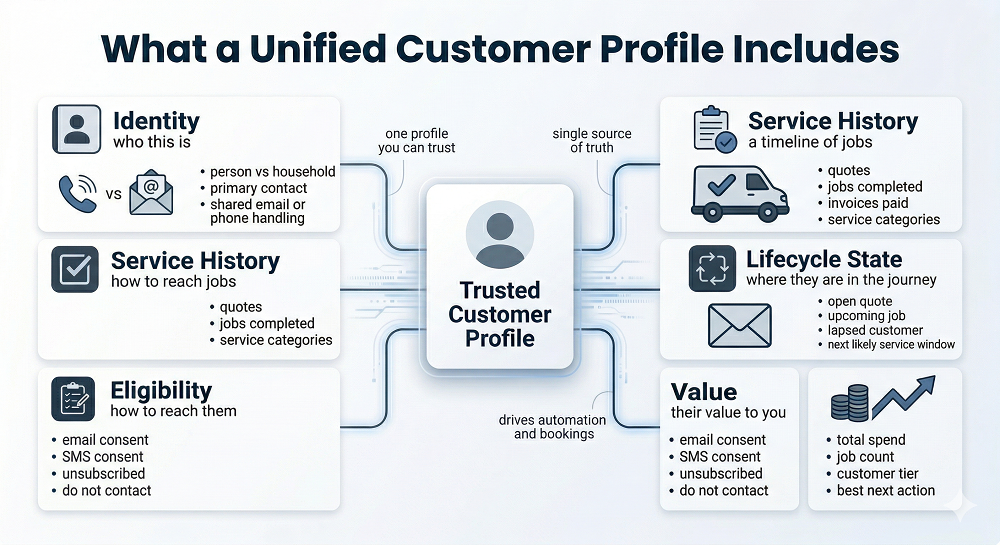
What you actually need is one profile the system can trust enough to make good decisions. In a service business, that means the profile should reliably answer five things:
- Identity: who this person or household actually is
- Service history: what has happened across requests, quotes, jobs, and payments
- Lifecycle state: where they are right now
- Eligibility: whether they can be contacted, and on which channel
- Value: why this customer matters and what they are likely worth
That's the useful version.
A profile without identity rules creates duplicates. A profile without service history sends the wrong offers. A profile without lifecycle state treats everyone like they're in the same moment. A profile without eligibility risks bad sends. A profile without value logic makes it hard to decide who should get what next.
This is also why "more CRM data" is not the answer on its own. More fields don't automatically create better decisions — they often create more ways to get confused. What matters is whether the profile is structured well enough to support timing, relevance, suppression, and measurement.
Why This Matters
The business case for unified profiles is straightforward, and the outcomes are concrete.
When communications are personalized using unified profile data, businesses consistently see meaningful lift in engagement and bookings. The mechanism is simple: when the system knows what actually happened — which service was completed, when it was done, what was quoted but not booked, how long it's been — it can send messages that reflect reality instead of guessing.
The specific gains tend to follow a predictable pattern:
Higher quote-to-book rates because follow-up can reflect actual customer state, prior service history, and exclusions for people who already booked.
Higher repeat rates because service-due reminders are based on real completion dates and real categories, not guesses or broad calendar blasts.
Better upsell and cross-sell performance because the system knows what the customer actually bought before — not just which list they happen to be on right now.
Cleaner deliverability because suppressions and consent rules can be applied consistently across duplicates, shared households, and multiple channels.
More accurate reporting because email and SMS activity can be tied back to booked jobs in a way that actually survives scrutiny.
That last one matters a lot. Without a unified profile, "revenue from automation" tends to drift into storytelling. With one, it gets much easier to answer practical questions: which customers responded, which jobs booked, which categories performed, and whether the flow created value or just activity.
The Moment You Know You Need This
Not every service business needs a mature unified-profile model on day one. But there is a clear point where the basics stop being enough.
You're usually there when some combination of these is true:
- You have multiple locations, teams, or technicians
- You offer recurring services or seasonal service cycles
- You run both email and SMS, and possibly paid retargeting too
- You have duplicate clients, shared households, or shared inboxes
- You can't confidently answer: "Who are our best customers and what should they get next?"
That last question is a good test. If the answer depends on tribal knowledge, spreadsheets, or whoever happens to remember the account history, you probably need a stronger profile model. Because once scale enters the picture, memory stops being a system.
What Breaks Without Unified Profiles
The failure modes are not subtle. They just tend to arrive one at a time.
You start seeing duplicate sends because two records belong to the same household but the system treats them as separate contacts. Then you notice conflicting messages because one record qualifies for a quote follow-up while the other is already marked as booked. Then unsubscribes stop feeling reliable because suppression was applied to one profile but not the matching duplicate.
Timing drifts too. Service-due reminders go out too early for one customer and too late for another because "last completed job date" is inconsistent across records. Cross-sell logic gets sloppy because service naming is messy. Repeat customers get treated like first-timers because their history is split. Reporting stops reconciling with actual bookings because the messaging record and the operational record are no longer telling the same story.
This is exactly the kind of system drift covered in What Breaks When Jobber Data Isn't Modeled Correctly (and How to Fix It). A unified profile is essentially the maturity-stage answer to that problem. Instead of patching symptoms one by one, it gives the automation layer a stronger source of truth.
The Required Building Blocks
This part is less glamorous. It's also the part that decides whether the whole thing works.
1. Identity Resolution Model: Person vs. Household
Service businesses don't live in a neat one-person, one-email, one-record world.
A household may have two adults — one handling scheduling, the other handling billing. A shared inbox may exist alongside personal email addresses. A landlord, a property manager, and a tenant might all touch the same property. Sometimes the property is the stable entity. Sometimes the individual is.
So the model needs rules. You need to define:
- Who counts as the primary contact
- How shared emails and phones are handled
- How spouse or partner decision-makers are linked
- Whether property address can serve as a grouping key, and when it shouldn't
That last part matters because address feels reliable until it doesn't. Some properties have multiple units. Some customers move. Some commercial accounts behave nothing like residential households. Address can help, but it should not be treated as a catch-all.
A good identity model accepts that person-level and household-level truth can both matter. The goal is not to flatten everything into one record — it's to decide how records relate so messaging stops contradicting itself.
2. Canonical Lifecycle Timeline
Static profile fields are not enough for service-business automation. You need a timeline.
That timeline should reflect the actual flow of the customer relationship:
- Request received
- Quote sent
- Quote approved or declined
- Job scheduled
- Job completed or canceled
- Invoice paid
Why does this matter so much? Because lifecycle decisions depend on order and timing. A profile that simply says "last quote = yes" is much less useful than a model that can tell you when the quote was sent, whether it was approved, whether a job was created afterward, and how long it has been sitting open.
Status plus timestamp beats static fields almost every time. This also lines up with From Quote to Job to Invoice: Mapping the Jobber Customer Lifecycle. Once the lifecycle is modeled as a timeline instead of a handful of overwritten values, automation starts behaving more like a system and less like a guess.
3. Service Taxonomy Normalization
Free-text service naming feels harmless until you try to automate around it. Then it gets messy fast.
One team member writes "Gutter Cleaning." Another writes "gutter clean." Another writes "exterior package." A fourth bundles the same service under a seasonal offer title that never maps back cleanly. Now the business thinks it knows what customers bought, but the automation layer sees a pile of almost-matching labels.
That breaks segmentation. It also breaks upsells, reactivation logic, and service-due reminders. A controlled taxonomy fixes this by mapping Jobber line items and service titles into a smaller, usable set of service categories — not because taxonomy is exciting, but because no one wants cross-sell logic that feels random.
4. Eligibility Layer: Consent and Suppression
This is one of those components that quietly protects the whole system.
A unified profile needs a centralized eligibility layer that answers:
- Can this person receive email?
- Can this person receive SMS?
- Do suppression flags override everything else?
- What happens when channel permissions conflict across duplicate records?
Email eligibility and SMS eligibility should not be treated as interchangeable — they are separate rules. Suppression logic should be global enough to win every conflict. Otherwise the system ends up doing the worst possible thing: acting confident when it should be cautious.
The Unified Profile Schema
This section is meant to be practical enough to drop into a plan.
Table A — profile_master
The core identity layer. One row per person or household, depending on how your model is structured.
Suggested fields: profile_id (canonical key), person_id, optional household_id, primary and alternate email, primary and alternate phone, address or service area (if relevant), preferred contact channel, email consent flag, SMS consent flag, unsubscribed flag, do-not-contact flag, bounced flag, complaint flag.
The important part is not the exact naming. It's the idea that identity and eligibility live somewhere stable enough to govern downstream messaging decisions.
Table B — service_history
This table should contain facts, not interpretation.
Suggested fields: last completed job date, job count in the last 12 months, lifetime job count, total spend in the last 12 months, lifetime spend, primary service category, last service category, inferred typical cadence, last technician (when useful), satisfaction proxy (review left, NPS, or similar if available).
This is the layer that helps the system understand what kind of customer this is based on actual behavior — not guesswork or recency alone.
Table C — lifecycle_state
This table should reflect current status, not permanent history.
Suggested fields: open quote flag, open quote age, upcoming job scheduled flag, upcoming job date, lapsed-by-category flag, simple churn-risk tier.
This is where the automation layer gets its "what should happen next" context. It doesn't replace raw events — it translates them into operationally useful state.
How Unified Profiles Power Advanced Automation
This is where the whole thing starts paying for itself.
Precision Quote Follow-Up
A basic quote follow-up sequence is helpful. A unified-profile version is much better.
Now the business can branch by quote age, prior service history, customer value, or category. It can exclude people the moment a quote is approved or a job is scheduled. It can send a different follow-up path to a high-value repeat customer than to a first-time lead. That means less noise, better conversion, and fewer trust-killers — like nudging someone who already booked.
Category-Based Maintenance Reminders
This is where "last completed job date + service category + inferred cadence" becomes genuinely useful.
Instead of blasting broad seasonal messages, you can send reminders that reflect what the customer actually bought, when it was completed, and when that service is normally due again. That makes the message feel earned instead of promotional. This is also why The Most Overlooked Revenue Trigger in Jobber: Job Completion matters so much — completion is not just a closed task. It's the timestamp that powers the next correct reminder.
Tiered Retention and VIP Treatment
Not all lapsed customers deserve the same response.
A high-LTV repeat customer who has gone quiet shouldn't get the same winback path as a one-time bargain buyer from two years ago. Unified profiles make that distinction easier because value tiers and service history are already part of the model. That opens the door to different messaging by value tier, different urgency framing, and better prioritization around scheduling or add-on education. You don't need to build an elaborate loyalty program — you just need the system to stop treating all customers as equally important in the same way.
Cross-Sell That Actually Makes Sense
Cross-sell tends to underperform when it's based on loose assumptions. It performs better when it uses service adjacency logic — what tends to follow what?
Unified profiles make this easier because they combine history, category normalization, and lifecycle timing in one place. That makes the next offer feel relevant instead of random.
Multi-Channel Consistency
Email and SMS work better when they share the same truth — not the same behavior, the same truth.
A unified profile lets the system coordinate messaging across channels while still respecting different channel rules, frequency expectations, and eligibility. Email carries detail, proof, and educational context. SMS handles immediacy and reminders. But both should reference the same customer state, the same suppressions, and the same lifecycle logic. Otherwise you end up with cross-channel confusion — which is just a more modern version of the same old data problem.
Where This Lives
The cleanest model is usually this:
- Jobber = operational system of record
- Klaviyo = orchestration and messaging execution
- Structured model layer = unified profile truth and governance
That division matters. Jobber holds the operational reality around clients, jobs, quotes, and invoices. Klaviyo handles segmentation, automation, and channel execution. The structured model layer — whether a formal warehouse or a lighter data layer — is where identity resolution, service taxonomy, lifecycle state, and governance come together.
This is really the end-state version of Jobber to Klaviyo: Turning Service Business Data Into Automated Revenue. The pillar explains the system. Unified profiles explain what maturity looks like once the basics are working.

Implementation Path
This doesn't need to become a risky giant rebuild. A phased approach is usually better.
Phase 1 — Consolidate Identity and Eligibility
Start by stopping the most obvious pain. Focus on deduping rules, primary contact logic, suppression precedence, and channel-specific eligibility. This phase is less about sophistication and more about preventing duplicate sends and compliance mistakes.
Phase 2 — Normalize Categories and Stabilize Last Service Date Logic
Next, clean up the parts that control timing and relevance. That means mapping services into a usable taxonomy, making "last completed job" logic replay-safe, and ensuring completions, cancellations, and reschedules are interpreted consistently. This phase tends to improve reminder accuracy and cross-sell quality quickly.
Phase 3 — Introduce Value Tiers and Lifecycle State
Once the profile is stable, add more strategic context: LTV bands, open quote state, lapsed windows by category, and simple churn-risk logic. Keep it rule-based and practical. This is not the moment to pretend you need a machine-learning layer.
Phase 4 — Activate Advanced Automations
Now the more sophisticated work gets easier. This is where you can launch VIP retention flows, category-specific service-due systems, better cross-sell sequences, more precise quote follow-up, and coordinated email and SMS programs. By this point, the automation is finally standing on something solid.
The QA and Governance Checklist
Advanced teams don't skip this part. A unified profile is only useful if it stays trustworthy over time.
The checklist should include:
- One profile per person or household, with an audit trail
- Segment parity checks so counts stay stable and explainable
- Documented precedence for consent and suppression
- Field contracts for critical states like job status, dates, and quote state
- Monitoring for sudden audience swings, send spikes, bounce changes, and complaint changes
The point is not bureaucratic perfection. It's preventing quiet drift. Because once the model starts drifting, the automation drifts with it.
The More Mature Next Step
If basic automation gets a service business started, unified profiles are what let it scale without becoming noisy, brittle, or impossible to trust.
That is the real jump. You move from "we have flows" to "we have one source of truth that helps those flows make better decisions." And once that happens, automation starts acting more like revenue infrastructure and less like a collection of smart-looking sends.
A useful next asset from here would be a Unified Profile Blueprint for Jobber — one page outlining the schema, the identity rules, the lifecycle states, and the recommended first advanced flows.
For full system context, this points back to Jobber to Klaviyo: Turning Service Business Data Into Automated Revenue.
FAQ
What's the difference between a customer profile and CRM data? CRM data usually stores contact and activity records. A unified customer profile goes further by resolving identity, lifecycle state, service history, eligibility, and value into one source the automation layer can trust.
Should we model by household or by individual? Usually both concepts matter. Messaging often happens at the individual level, while service history may cluster around the household or property. The right model defines how those two layers relate instead of forcing everything into one bucket.
How do we handle shared emails and phones? You need explicit rules for primary contact, shared contact methods, suppression precedence, and household grouping. Shared data should not be left to implicit assumptions or whichever record was updated most recently.
What fields actually matter for service-business automation? The essentials are identity keys, consent and suppression flags, service category, last completed job date, open quote state, upcoming job status, and enough spend or job-count history to understand customer value.
Do we need a data warehouse to build unified profiles? Not always. What you need is a structured model layer somewhere reliable. For some teams that will be a warehouse. For others it may be a lighter setup. The main requirement is that identity, lifecycle state, and eligibility are governed consistently — not where they live.