
Email marketing for service businesses does work. It just usually gets set up with the wrong playbook.
That's the real problem.
When owners say email "doesn't work," what they often mean is that the version they tried didn't produce bookings, didn't improve rebooking, and didn't feel worth the effort. Fair enough. But in most cases, email itself is not the issue. The strategy is.
More specifically, the strategy was copied from ecommerce.
That's where things go sideways. Research backs this up: automated, behavior-triggered emails generate roughly four times more revenue than one-off broadcast sends — yet most service businesses spend the bulk of their effort on exactly that kind of broad, untriggered send. The channel isn't the problem. The approach is.
Service businesses are not trying to recover carts all day, push weekly promos, or train customers to buy on impulse. They're working with fewer transactions, longer buying cycles, trust-sensitive decisions, and a very different definition of revenue. The goal is not getting someone to click "buy now." The goal is getting the right customer to book at the right time.
That changes everything.
If the system-level view lives in Jobber to Klaviyo: Turning Service Business Data Into Automated Revenue, this post handles the mindset reset: why service-business email underperforms, what people get wrong, and what actually works instead.
The Real Reason It "Doesn't Work"
Email does not fail on its own. The strategy fails because it was built for a different business model.
Ecommerce advice tends to assume frequent purchase opportunities, bigger lists, fast buying cycles, and a lot of promotional pressure. If someone doesn't buy this week, maybe they buy next week. If they abandon a cart, there's an obvious recovery path. If a brand wants to run another sale, there's usually another excuse to send.
Service businesses don't work like that. They usually have:
- Fewer transactions per customer
- Longer intervals between purchases
- More local competition and trust friction
- More revenue tied to bookings, not instant checkouts
- More importance on timing, need, and availability
That means the usual "send more campaigns" advice tends to miss the point. A customer doesn't book HVAC service because they received a pretty newsletter on Tuesday. A homeowner doesn't schedule gutter cleaning because the subject line was clever. A commercial client doesn't suddenly convert because you finally added enough urgency to the preview text.
They book when there is need, trust, relevance, and timing. That's the model. And when email is built around that model, it starts working a lot better.

The 7 Mistakes That Make Service-Business Email Underperform
1. Treating Your List Like an "Audience," Not a Schedule
This is one of the quietest mistakes, and it causes a lot of waste.
A service business list is not just an audience to broadcast to. It is a pool of people connected to real operational constraints: technician availability, seasonal demand, service mix, geography, and schedule gaps. That means email shouldn't just "go out" — it should support the calendar.
When businesses ignore that, they default to generic sends that don't line up with actual capacity. They send campaigns because it has been a while. They send promos because they want more revenue. They send updates because sending feels like progress.
Meanwhile, the real question is simpler: what does the business need booked, and when? That framing changes the channel from a marketing habit into an operational lever.
2. Blasting Promos Instead of Triggering Moments
This is probably the most common carryover from ecommerce.
A lot of businesses assume email needs to be promotional to work. So they send discounts, monthly newsletters, or broad "book now" campaigns to everyone and hope something sticks. Usually, not much does.
Service-business email performs better when it responds to moments, not when it imitates retail behavior. A quote was sent. A job was completed. A customer is due for service again. A lapse window is opening. Capacity is soft next week. That's when the message matters.
Timing beats discounting more often than people want to admit. Not because discounts never work — they do. But the stronger lever is usually relevance. A reminder that reaches someone right when they're due for seasonal service is often more effective than another generic promo code.
3. No Lifecycle Stages, So Everyone Gets the Same Email
Once everyone gets treated the same, relevance collapses. That is the real cost of not having lifecycle stages.
A prospect with an open quote doesn't need the same message as a repeat customer who just completed a job. A first-time customer shouldn't get the same follow-up path as a lapsed customer who hasn't booked in 14 months. Someone who only knows your business from one request form shouldn't receive the same tone, offer, or ask as a loyal multi-service client.
Still, this is exactly what happens in a lot of service-business email setups. Everyone lands in the same pool. Everyone gets the same campaign. The business calls it consistency. The customer experiences it as irrelevance.
That is one reason From Quote to Job to Invoice: Mapping the Jobber Customer Lifecycle matters so much. The lifecycle is not a nice-to-have framework — it is the structure that keeps different customers from being flattened into one generic messaging stream.
4. Weak Data, or No Usable Data from Jobber
A lot of email problems are really data problems with better branding.
If the business can't reliably identify last completed job date, open quote status, service category, or next due window, the automations will always feel shaky. Messages go out too early, too late, or to the wrong people. Segments stop feeling trustworthy. The team falls back to manual work because the system keeps missing context.
That is not a copy problem. It is a modeling problem. And if the data coming out of Jobber isn't clean enough to support automation decisions, the email layer ends up guessing. That's usually where performance falls apart.
This is also why the technical side matters more than it seems. What Breaks When Jobber Data Isn't Modeled Correctly (and How to Fix It) exists because a connected system is not automatically a reliable one.
5. Not Solving the Two Biggest Leaks: Quotes and Rebooking
A lot of service businesses spend too much time asking what campaign to send next and not enough time fixing the obvious leaks.
Two usually matter more than almost everything else:
- Quote follow-up
- Rebooking reminders
Quote follow-up is often the highest-ROI automation in the stack because the intent already exists. The customer asked. The business responded. The opportunity is active. If there's no structured follow-up, that revenue just floats around waiting for a manual nudge — or quietly disappears.
Rebooking is the second big lever. A lot of service businesses do good work, earn the customer once, and then fail to return at the right time. Not because the customer had a bad experience. Just because there was no system for bringing them back. That is avoidable. And it usually matters more than another newsletter.
6. No Trust-Building Sequence for Risk-Averse Buyers
Service purchases carry more perceived risk than a lot of marketers account for.
You are not just selling a product. You are asking someone to let a person into their home, onto their property, or into their business. That makes trust content far more important than clever copy. Customers want to know:
- What happens next and what to expect
- Who is showing up
- Whether the company is reliable
- What other customers experienced
- Whether the job will be done right
- Whether there is any guarantee or process behind the service
This is why pure promotional messaging often underperforms — it skips the psychological part of the sale. A trust-building sequence doesn't need to be dramatic. It just needs to reduce uncertainty. Proof, process, expectations, and reassurance usually do more work here than brand voice gymnastics.
7. No Measurement Tied to Bookings
If email is only measured by opens and clicks, it will eventually get blamed for the wrong things. That's almost guaranteed.
Service businesses need a clearer link between sends and operational outcomes. Not because engagement metrics are useless, but because they are incomplete. A channel can have respectable click performance and still do very little for booked revenue. On the other hand, a simple automation with modest click numbers can drive real business value if it improves quote conversion or repeat bookings.
The real questions are:
- Did this help book the job?
- Did this improve rebooking?
- Did this reduce schedule gaps?
- Did this increase average job value?
- Did this bring back customers before they churned?
If you can't connect email to those outcomes, the channel starts looking decorative. And once that happens, teams either underinvest in it or abandon it altogether.
What "Winning Email" Looks Like for Service Businesses
Success looks different here. It is not about becoming a prolific sender or building a massive content machine.
Winning email for a service business usually looks like:
- Higher quote-to-book rates
- More repeat bookings per customer
- Fewer idle schedule gaps
- Higher average order value through add-ons
- More reactivated lapsed customers before they disappear
That's the scoreboard. Not volume. Not busyness. Not a vague sense that "we're finally doing email."
This is also why The Most Overlooked Revenue Trigger in Jobber: Job Completion matters so much. In service businesses, revenue often comes from what happens after the job is done: reviews, referrals, rebooking, next-service education, and upsell timing. Job completion is not the end of the customer relationship. It is often the start of the next revenue moment.
The Correct Model: Email as a Lifecycle System, Not a Newsletter Habit
The cleaner way to think about email is as a lifecycle system with two distinct layers.
Layer 1 — Transactional and operational
This is where Jobber is strong. Appointment confirmations, reminders, receipts, invoices, basic updates. These messages keep work moving and keep customers informed. They're necessary — they're just not the full growth system.
Layer 2 — Revenue lifecycle
This is the layer that belongs in Klaviyo. It includes things like:
- Quote follow-up
- Post-service review and referral
- Maintenance reminders
- Winback and reactivation
- Add-on education and upsell
- Seasonal campaigns tied to real demand and capacity
This is the model that makes the whole setup feel coherent. Jobber holds the operational truth. Klaviyo handles the segmentation, timing, branching, and lifecycle automation.
That is the broader system behind Jobber to Klaviyo: Turning Service Business Data Into Automated Revenue — and it is a much better fit for service businesses than trying to force everything through a newsletter habit.
The Minimum Data You Need to Make Email Work
You don't need a giant data project before launching useful flows. The core fields that matter are covered in depth in What Breaks When Jobber Data Isn't Modeled Correctly (and How to Fix It), but at a minimum you need:
- A clean client or household identifier with one reliable email
- Core events: quote sent, quote approved, job completed, invoice paid
- Key properties: service category, last completed job date, and location or zone where relevant
- Eligibility fields: consent status and suppression or do-not-contact flags
That is enough to answer basic lifecycle questions without falling apart. You can build from there.
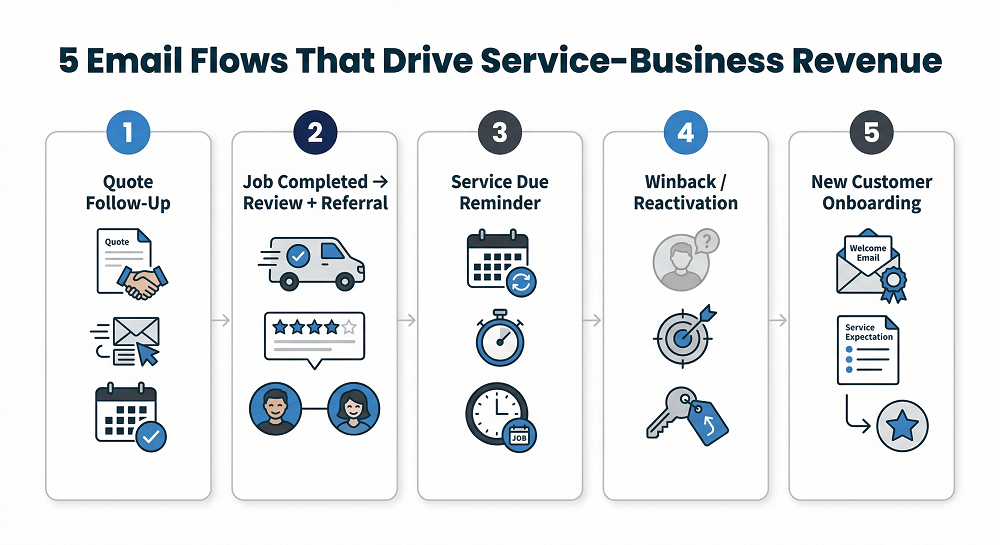
The 5 Flows That Fix 80% of the Problem
Not ten automations. Not a content calendar. Five useful flows.
1. Quote Follow-Up Flow
Often the biggest missed revenue lever. A quote goes out. The customer gets distracted. Nothing happens. A proper follow-up flow handles reminders, timing, objection-softening, and exits automatically when the quote is approved. Simple, practical, and tied to real intent.
2. Job Completed → Review + Referral
This one turns completed work into trust and future acquisition. When the timing is right, you ask for a review while the experience is still fresh, then follow with a referral prompt or next-step offer. That creates a better post-service loop than hoping satisfied customers remember to talk about you later.
3. Service Due Reminder
Based on cadence or seasonality. Some services have a natural recurrence window. Others depend on climate, geography, or the customer's last completed job. The goal is the same: show up before the need becomes urgent or forgotten. That timing is usually more effective than a generic promotion.
4. Winback or Reactivation
Lapsed customers don't need to stay lapsed. A reactivation flow re-engages customers who have gone quiet based on service category and the expected return window. The key is setting the lapse window correctly — not treating every service category the same.
5. New Customer Onboarding
This one gets overlooked most often. New customers frequently need expectation-setting more than they need another promotion. A good onboarding flow explains what happens next, how service works, what to expect from the team, and what related services might make sense later. That reduces early churn and builds trust before it's needed.
Start with 2 flows, not 10. For most service businesses, quote follow-up and post-service review/referral are the best first pair.
Why "More Segmentation" Isn't the Fix
A lot of teams hear "relevance" and immediately assume they need far more segmentation. Usually, they don't.
Over-segmentation creates its own problems. Reach shrinks. Operational debt grows. The team spends more time maintaining audiences than improving the messages that matter. Suddenly there are seventeen micro-segments and nobody is sure which one actually drives bookings.
A better model is simpler:
- Basic lifecycle buckets
- Service category overlays
- Timing windows based on last completed job
That gets you most of the value without turning the system into a maintenance project. Segmentation should support action, not become a hobby.
Common Objections, Service-Business Edition
"Our list is too small." That's usually not the real problem. You don't need a giant list for lifecycle email to matter. You need enough customer activity for timing and follow-up to influence bookings. A smaller list with useful automation often outperforms a larger list with generic sends.
"We don't send often enough." Frequency is not the main variable. Timing is. If messages are tied to real revenue moments, you don't need constant volume. In fact, service businesses often perform better with fewer, more relevant sends than with a forced weekly cadence.
"People don't read emails." Some do. Some skim. Some ignore most of them. That has always been true. Still, email keeps working when it arrives at the right moment and answers a real question. A quote reminder, service-due notice, or trust-building post-service sequence doesn't need everyone to become a devoted reader. It needs the right people to see the right message when it matters.
"We don't have time to create content." That's exactly why triggered flows matter more than content marketing here. You don't need an endless stream of new ideas. You need a few strong automations tied to the moments the business already creates: quotes, completions, due windows, and lapses.
"We already text customers." Good — keep doing that. Email and SMS are not enemies. One handles immediacy well. The other handles context, trust, proof, and detail better. Used together, they work better than either channel alone.
A 7-Day Way to Start
Day 1 — Define revenue moments
Pick the moments that already matter in the business:
- Quote sent
- Job completed
- Lapsed customer window
That gives you the basic structure without overcomplicating the launch.
Days 2–3 — Clean core fields
Focus on the fields that make timing and targeting possible:
- Last completed job date
- Service type or category
- Consent status
Don't overbuild. Just get the essentials into usable shape.
Days 4–7 — Launch 2 flows and one small campaign
Start with quote follow-up and review/referral. Then, if capacity or seasonality makes sense, add one small campaign designed to fill a specific gap — not just "send something."
That is enough to start learning from.
The Better Next Step
If email has felt underwhelming in a service business, the problem usually isn't that the channel is dead. It's that the model was wrong.
Service businesses need lifecycle email tied to bookings, trust, timing, and customer state. They don't need to imitate ecommerce brands and hope more campaigns somehow fix the gap.
That's the bigger bridge back to Jobber to Klaviyo: Turning Service Business Data Into Automated Revenue. Once Jobber data is structured correctly and synced into Klaviyo, email starts acting less like a newsletter habit and more like a revenue system.
A practical next asset from here would be a simple Jobber → Klaviyo Flow Map or Lifecycle Blueprint showing which events, segments, and flows should come first.
FAQ
Does email marketing work for service businesses? Yes — when it's built around lifecycle timing, trust, and bookings instead of generic ecommerce-style promotions. The issue is usually the strategy, not the channel.
What emails should a service business send? At a minimum: quote follow-up, post-service review and referral, service-due reminders, reactivation for lapsed customers, and onboarding for new customers. Transactional emails like confirmations and receipts still matter too.
How often should a service business email customers? There is no perfect number. What matters more is sending at useful moments. Triggered flows tied to real service events almost always outperform a fixed campaign cadence.
What's the best automation to start with? For most service businesses, quote follow-up is the strongest place to start. After that, a post-service review and referral flow is usually the next best move.
How do I use Jobber data for email automation? Start with reliable events like quote sent, quote approved, and job completed, plus a few core properties such as service category, last completed job date, and consent status. Then use that data to trigger lifecycle flows in Klaviyo.