
Jobber data modeling usually doesn't fail with a dramatic error. It fails quietly.
That's what makes it dangerous.
Most teams assume the integration is working because records are syncing, profiles exist, and flows are technically live. On the surface, everything looks connected. Underneath, the logic is off. And once the logic is off, the automation starts making bad decisions — not always obvious ones, either.
Sometimes it's a quote follow-up that goes out after the quote was already approved. Sometimes a review request fires before the job is actually completed. Sometimes repeat customers get treated like brand-new leads because their history is split across records. Sometimes reporting says the flow is "performing," but nobody can tie it back to booked jobs with confidence.
That's what bad modeling looks like in the real world.
If the bigger system lives in Jobber to Klaviyo: Turning Service Business Data Into Automated Revenue, this post covers the technical failure layer: what breaks, why it breaks, and how to build a model that doesn't keep sabotaging your automations.
The Core Idea — Bad Data Modeling Doesn't Look Like an Error
Most automation failures don't throw alerts.
They show up as wrong sends, missing sends, duplicate sends, unstable segments, and reporting that never quite lines up with the business. That's why these problems tend to drag on longer than they should. Nobody gets a bright red warning that says your Jobber-to-Klaviyo model is unreliable. The flows keep running. Messages keep going out. The only real clue is that the system starts behaving in ways that feel inconsistent or slightly off.
That's enough to hurt performance.
And Jobber-to-Klaviyo setups are especially sensitive to modeling mistakes because service-business data is stateful. Quotes move through stages. Jobs get scheduled, rescheduled, completed, or canceled. Invoices are sent and paid on their own timeline. A customer record can belong to a person, a household, or a property relationship that isn't as simple as "one email equals one customer."
When that state is modeled loosely, the automation loses context. Then it starts guessing.
That's a big reason Why Jobber's Native Emails Don't Scale (and What to Use Instead) exists as a separate conversation. Once you move beyond basic operational messaging, automation quality is only as good as the underlying model.
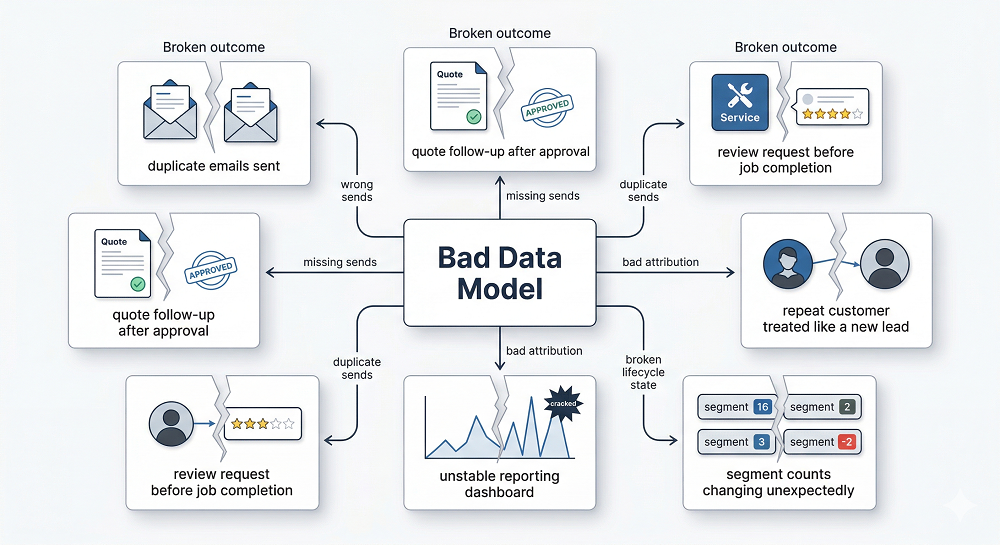
Symptoms: How You Know Your Jobber Data Model Is Broken
Usually, the system tells on itself. Not with a crash — with behavior.
A broken or unreliable model often looks like this:
- Customers get messages that don't match what actually happened
- Quote follow-ups keep firing after approval
- Review requests go out before the work is done
- Repeat customers are treated like first-timers
- Winback flows trigger too early, too late, or not at all
- Segments swing wildly from one week to the next
- Reporting can't be reconciled with booked jobs or revenue
That last one matters more than most teams realize. Once reporting stops lining up with operational outcomes, the team starts debating the system instead of trusting it. And when that happens, automation becomes harder to expand. Nobody wants to build more flows on top of a shaky foundation.
The 10 Things That Break, and Why
1. Identity Resolution Breaks First
Duplicate clients create duplicate messaging. That part is predictable. The messy part is how duplicates actually happen in service businesses.
One household may have two adults using separate emails. A shared inbox may exist for billing while a personal email gets used for service communication. A customer might submit a request with one email and approve a quote from another. Sometimes a phone number changes hands inside the same property. Sometimes the address stays constant while the contact structure changes.
Klaviyo does have native identity resolution that can automatically merge profiles when a customer provides matching identifiers — like an email and phone number together at a checkout or form submission. That helps in straightforward cases. But the service-business scenarios above are more complex: shared household contacts, property-level billing relationships, and split records between a request and an approval often won't be caught by automatic merging alone.
If those records don't resolve cleanly, the automation loses the thread. That creates problems like double sends to the same household, mismatched service history, broken suppression logic, wrong lifecycle stage assignment, and messy attribution. And because the records are "valid" on their own, the issue often hides in plain sight.
2. Job Status Drift Corrupts Downstream Logic
A lot of automation depends on job status being modeled strictly.
Not loosely. Not approximately. Strictly.
Scheduled, in progress, completed, and canceled are not interchangeable states. They carry different meaning, different triggers, and different downstream consequences. If those states are mapped inconsistently, everything that depends on them becomes unreliable.
A review request triggered off the wrong status is annoying. A reminder flow that keeps running after a cancellation is worse. A post-service upsell tied to "completed" becomes useless if half the jobs hit that status late or inconsistently. This is why service-business automation is more sensitive than people expect. Status is not just descriptive — it controls message timing. And when timing slips, trust slips with it.
3. Quote Lifecycle Misalignment Ruins One of Your Best Revenue Flows
Quote follow-up is usually one of the highest-leverage automations in a Jobber-to-Klaviyo setup. It's also one of the easiest to break.
If quote states aren't represented cleanly, the entire flow gets noisy fast. Maybe "quote sent" exists, but "approved" is delayed or not synced consistently. Maybe declined quotes sit in the same bucket as open quotes. Maybe viewed status is missing, so the system can't tell the difference between no response and active consideration.
That creates bad follow-up. Customers get reminders after they already approved. People who declined keep receiving nudges. High-intent opportunities get treated the same as dead ones. And what should have been a conversion flow turns into background noise.
That problem tends to show up long before teams notice it formally — usually first in lower trust, weaker response, and awkward customer replies.
4. Event Timing and Time Zones Throw Off Message Timing
This one sounds small until it isn't.
In service businesses, time matters more than most automation setups account for. Job completion timestamps, invoice timestamps, scheduling changes, reschedules, and local time zone differences all affect whether a message lands at the right moment.
If those events aren't modeled carefully, messages go out at the wrong time for reasons that are hard to spot. A review request might fire off the invoice event instead of job completion. A reminder might ignore a reschedule update. A "same-day" message might hit at night because the system is using the wrong time zone. A follow-up that should feel prompt ends up feeling late. Customers rarely explain why this feels off — they just engage less.
5. Service Categorization Errors Make Targeting Feel Random
Cross-sell and upsell logic depend on service categorization being usable. That sounds basic. In practice, it's often messy.
If service type is stored as inconsistent names, free-text entries, or loosely structured line items, segmentation becomes unreliable. One team member enters "Gutter Cleaning." Another enters "gutter clean." Another uses a package name that hides the service category entirely. Suddenly your audience logic is built on labels that mean the same thing to humans but not to the system.
That's where messaging starts to drift. The wrong offer goes to the wrong customer. Seasonal reminders miss people who should have qualified. Cross-sell paths feel random because the model can't normalize what was actually purchased.
This is one reason What You Can Automate When Jobber and Klaviyo Are Properly Connected is really a data conversation disguised as an automation conversation. The automation only looks smart if the categories underneath it are clean enough to support decisions.
6. Household Versus Individual Modeling Gets Messy Fast
This is the classic "one property, many contacts" problem. And it causes more trouble than people expect.
Service businesses often operate at the household or property level, but marketing systems tend to think in terms of individual contacts. That mismatch creates friction. One address may have multiple decision-makers. One person may handle billing. Another may manage scheduling. A landlord may be tied to one property while a tenant is the day-to-day contact.
If the model doesn't define how those relationships work, messaging conflicts are inevitable. One person unsubscribes and another still gets the emails. A spouse gets a review request for a service they never interacted with. Household history gets split across individual records, which makes repeat customers look new and active customers look lapsed.
The fix usually starts with defining a primary contact rule and some form of household grouping logic. Without that, the system ends up acting like the property and the person are always the same entity. They aren't.
7. Consent and Suppression Gaps Create Risk Quickly
This is the part teams often underestimate because the bad outcome isn't immediate.
If unsubscribes, do-not-contact flags, and channel preferences aren't applied consistently across records, the system can send messages it absolutely should not send. That is bad for trust, bad for deliverability, and sometimes worse than that.
The most common failures:
- Unsubscribes applied to one duplicate record but not another
- Do-not-contact flags ignored in segments
- Household records out of sync on suppression status
- SMS consent treated as if it also covers email, or the reverse
That last one is especially dangerous because it reflects a structural misunderstanding, not just a field issue. Eligibility has to be centralized and channel-specific. Otherwise the automation layer ends up making send decisions from incomplete consent logic.
8. Incremental Revenue Attribution Becomes Fuzzy at Best
If identifiers don't match cleanly across systems, revenue attribution turns into guesswork.
That doesn't always stop flows from running. It does stop teams from knowing whether those flows are actually working. You can't confidently tie an email recipient to a booking if the person identifier is unstable. You can't measure lift well if the quote record is detached from the messaging record. You can't reconcile flow outcomes if household, client, and job entities are floating around without a reliable relationship structure.
Then "email revenue" becomes more of a story than a number. And once that happens, strategy gets weaker. Teams keep automations they can't prove, cut automations they don't understand, and spend more time debating dashboards than improving the model.
9. Backfills and History Resets Can Rewrite Your Segments Overnight
This one catches teams off guard because it often happens during cleanup or sync improvements.
Old jobs get imported later. Historical records are replayed. A sync is re-run. A field gets recalculated. Suddenly "last service date" changes for thousands of profiles, and the segments move all at once.
That creates chaos. Winback audiences swell overnight. Recently serviced customers get pulled out of one flow and pushed into another. Reporting shifts without a real business change behind it. Everything looks unstable because, structurally, it is.
This is why replay-safe design matters. If the model doesn't define stable first and last logic, historical backfills can rewrite current customer state in ways that break automations and confuse the team.
10. Field Mapping Failures Break Personalization Quietly
This is one of the more frustrating failure modes because it often looks small until you see the downstream effects.
A property syncs with the wrong data type. A null value overwrites a useful field. A service label gets replaced with an empty value. A dynamic block depends on a field that stopped populating correctly two weeks ago. Nothing crashes. The email just gets worse.
Maybe a personalization block disappears. Maybe the wrong service name appears. Maybe content meant for one segment shows up for another because the property logic is incomplete. These are quiet failures, which makes them easy to miss and hard to trust. And once the team stops trusting personalization, they usually stop using it well.
Root Causes: What's Actually Going Wrong Under the Hood
The symptoms vary. The root causes are usually pretty familiar.
Most broken Jobber-to-Klaviyo models have some combination of these issues:
- No canonical IDs for key entities like client, job, quote, and invoice
- No clear definition of the "golden record" for a customer or household
- Events modeled as static attributes, or attributes modeled as events
- No normalized service taxonomy
- No tests or validation rules for critical fields like status, dates, and consent
That second one matters a lot. A good model needs to decide what the system considers authoritative. Which client record wins? Which household structure is primary? Which date controls last completed service? Which state is final enough to trigger a flow?
If there's no defined answer, the automation ends up making those choices implicitly. That's usually where the trouble starts.

The Fix: A Minimum Reliable Model for Jobber to Automation
You don't need a huge architecture overhaul to improve this. You need a minimum reliable model — enough structure so the automation layer can make consistent decisions.
Model 1 — Identity: Client Plus Household
Start with identity. You need a canonical person or household key, plus rules for:
- Deduplicating records
- Assigning a primary contact
- Linking people to households or properties
- Applying suppression consistently
- Preserving service history across merged identities
The goal isn't to flatten every relationship into one record. The goal is to make sure the system knows which records belong together and which one should control messaging decisions.
Model 2 — Lifecycle Events as a Timeline
Don't reduce the customer journey to a handful of overwritten fields.
Service businesses need a timeline. That timeline should include event states such as:
- Request received
- Quote sent, then approved or declined
- Job scheduled
- Job rescheduled
- Job completed or canceled
- Invoice sent
- Invoice paid
This is a much better foundation than trying to squeeze lifecycle meaning into a few profile attributes. A timeline preserves order. Order is what makes automation timing reliable. That idea lines up closely with From Quote to Job to Invoice: Mapping the Jobber Customer Lifecycle — the more clearly the lifecycle is modeled, the less guesswork your flows have to do.
Model 3 — Service Taxonomy Normalization
The system needs clean service categories. Not whatever people happened to type into a field. Not ten versions of the same service label. Not package names that hide the real category.
You need a normalized taxonomy that maps Jobber services or line items into usable automation groups. That makes it possible to build segments like:
- Customers due for seasonal maintenance
- Customers eligible for a related-service upsell
- Customers lapsed by service category
- Customers who bought one service but not the next logical one
Without that normalization, segmentation stays brittle.
Model 4 — Eligibility Layer
This part gets overlooked because it feels administrative. It isn't.
You need a centralized definition of who is sendable, who is suppressed, and which channels each record is eligible for. Email and SMS should not be treated as interchangeable permissions. Unsubscribes should not live on isolated records. Do-not-contact logic should not depend on whichever source updated last.
Eligibility needs to be explicit. Otherwise every flow is exposed to bad send decisions.
A 15-Minute Data QA Test Before You Launch Flows
Before launching or expanding automations, run a quick reliability check on your model. These aren't trick questions — they're the baseline your automation actually depends on:
- Do we have one usable record structure per person or household?
- Are job statuses mapped to a strict list of allowed values?
- Can we identify last completed job date reliably?
- Can we identify open quote status reliably?
- Do we know service category for most jobs?
- Are unsubscribes and do-not-contact rules honored everywhere?
- Do segment counts stay reasonably stable day to day?
- Can we tie a booking back to an email recipient reliably?
If the answer to several of those is no, the issue probably isn't the email copy. It's the model. And fixing the copy before fixing the model usually just makes the failure more polished.
Guardrails That Keep This from Breaking Again
Once the model is more reliable, the next job is keeping it that way. A few guardrails help considerably:
- Data contracts for critical fields and states
- Versioned definitions for metrics like last service date and lapse window
- Monitoring for segment-size swings, sync failures, bounce spikes, and complaint spikes
- Kill-switch rules for flows when upstream data looks questionable
You don't need fancy infrastructure to think this way. You just need the discipline to treat automation inputs as something worth validating before they trigger customer-facing messages. That mindset is what keeps a technically connected system from drifting back into quiet failure.
The Real Limit Is Not the Flow. It's the Model.
A lot of teams try to fix misfiring automations by rewriting copy, changing delays, or tweaking segment logic. Sometimes that helps. A lot of the time, it's treating the symptom.
If the underlying Jobber data model is unreliable, the automation can only be so good — no matter how polished the emails are or how much logic you stack on top. Automation quality is capped by modeling quality.
That's the bridge back to the pillar: Jobber to Klaviyo: Turning Service Business Data Into Automated Revenue. The connected-system idea only works when the data structure is reliable enough to support segmentation, timing, attribution, and state.
Otherwise, you don't have a lifecycle engine. You have a sync that looks busy.
FAQ
Why are my automations sending at the wrong time? Usually because the event timing, job status logic, or time zone handling is off. In service businesses, even small timing mistakes can create messages that feel late, early, or disconnected from what actually happened.
Why are customers getting duplicate emails after syncing Jobber? The most common reason is identity resolution. Klaviyo has native deduplication that handles straightforward cases, but service-business-specific scenarios — shared household emails, billing versus service contacts, property-level records — often require additional modeling rules upstream before the data reaches Klaviyo.
What's the most important Jobber field to model correctly? There isn't just one, but job status is among the most critical because so many downstream triggers depend on it. If status is inconsistent, timing and flow eligibility start breaking immediately.
How do I prevent wrong messages after reschedules or cancellations? You need lifecycle events modeled as a timeline, not just a static field snapshot. Reschedules and cancellations should update the flow logic in a way that suppresses or reroutes messages based on the new state.
How do I structure Jobber data for Klaviyo segments? Start with a reliable identity model, strict lifecycle events, normalized service categories, and a centralized eligibility layer for consent and suppression. That gives Klaviyo enough structure to segment based on real service behavior instead of messy field guesses.