
Jobber's native emails are fine when your business is small, your team is tight, and most communication is still happening from memory.
That's usually where the confusion starts.
A lot of service businesses assume they already "have email automation" because Jobber sends reminders, updates, and a few basic messages. Technically, yes. Operationally, sure. But once you need email to do more than confirm appointments and keep clients informed, the cracks show up fast — and they usually show up in revenue.
The issue isn't that Jobber is broken. It's that people expect an operations tool to behave like a lifecycle marketing system. Those are not the same thing.
If you've already mapped the bigger picture in Jobber to Klaviyo: Turning Service Business Data Into Automated Revenue, this is the practical follow-up: what stops scaling first, why it happens, and what to use instead.
Quick Context — What Jobber Email Is Built For
Jobber is built to help service businesses run work. Its email functionality makes sense when you look at it through that lens. It supports service updates, scheduling communication, quoting, invoicing, and the kinds of customer messages that keep operations moving. That's useful. You need that.
Jobber has also added a Campaigns feature (available as a paid add-on) that allows some automated and one-off email campaigns with basic segmentation. For many smaller businesses, it covers the basics.
But operational messaging and revenue lifecycle messaging are fundamentally different jobs. One keeps the customer informed. The other moves the relationship forward.
That difference is easy to miss when you're smaller. A reminder email feels like a system. A quote email feels like follow-up. So teams stretch native email farther than it was meant to go. At first, that kind of works. Then the business adds more services, more customers, more technicians, more handoffs, more follow-up gaps — and suddenly the thing that "mostly worked" turns into a pile of manual patches.
That's the scaling gap. You're not failing at email. You're trying to use an operations messaging layer as a lifecycle engine.
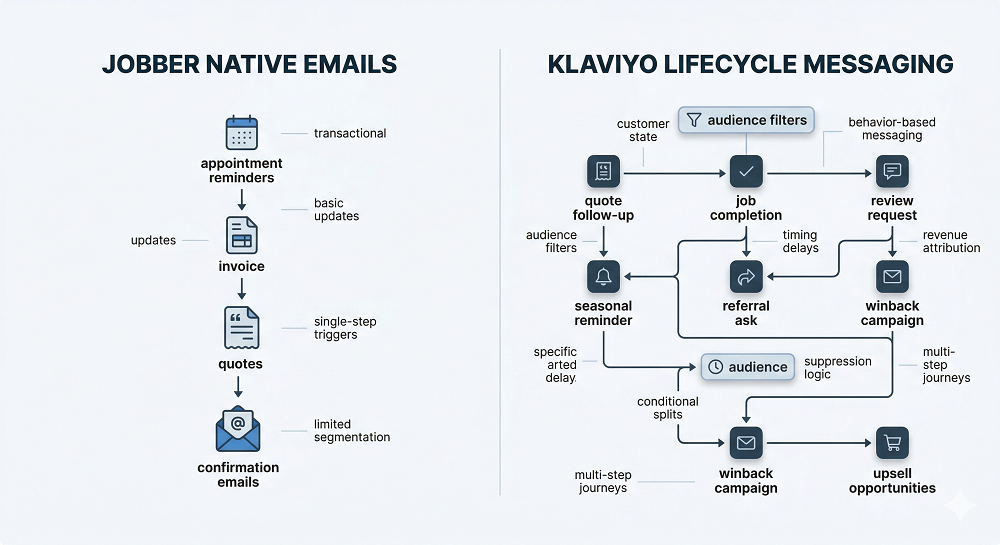
The 6 Reasons Jobber's Native Emails Don't Scale
1. Limited Segmentation and Targeting
Most service businesses don't need fancy segmentation for the sake of it. They need useful segmentation — things like:
- Customers who haven't booked again within their normal service window
- Customers with a recent quote but no scheduled job
- Customers who bought one service but not the adjacent one
- High-frequency clients who should get a different upsell path than one-time buyers
- Seasonal customers whose timing depends on service category and last completion date
This is where native email starts to feel thin. Basic filters can help you send broad messages, but they don't give you a real lifecycle view of the customer. Without that, every campaign starts to feel blunt — you either send too broadly, or you skip sending because you don't trust the audience. Neither outcome helps.
If you've read From Quote to Job to Invoice: Mapping the Jobber Customer Lifecycle, you already know the important part: lifecycle value comes from the handoffs between customer states. Segmentation has to reflect that movement, not just static contact data.
2. Weak Automation Logic
A trigger is not a system.
This is one of those things that sounds obvious until you see how many teams build around a single event and call it automation. Yes, you can trigger a message when something happens — that's useful. But scaling email usually needs more than "when X happens, send Y." You need logic like:
- If a quote was sent but not approved, start follow-up
- If the quote gets approved, stop the follow-up immediately
- If the customer books, move them into pre-service messaging
- If they don't engage, change the cadence
- If they already received a similar message last week, suppress the send
- If they belong to a high-value segment, route them differently
That's not complexity for the sake of complexity. That's basic control. Without branching, exclusions, throttling, and sequence logic, your automations stay shallow. They can fire — they just can't adapt. And that's when customers start getting messages that are technically triggered but strategically wrong.
3. No Durable Customer State
This is the part most teams skip because it sounds too technical. Still, it's the part that decides whether lifecycle marketing actually works.
To scale, your email system needs some persistent understanding of where the customer stands right now — not just what happened once, but what that event means over time. Think about the fields that actually matter:
- Last service date and next likely due date
- Last quote date and quote status
- Service category and location
- Total job count and total spend
- Lapse window by service type
- Last completed job and last declined service or estimate
Without customer state, every message has to guess. And guessing gets expensive fast. You send reminders to customers who aren't due yet. You send generic promos to customers who just bought. You miss reactivation timing because nobody is calculating when "lapsed" actually starts for that service type.
This is also why The Most Overlooked Revenue Trigger in Jobber: Job Completion matters so much. A completed job isn't just a closed task — it changes customer state. It should unlock reviews, referrals, upsells, maintenance reminders, and rebooking logic. If your email setup can't hold that state and act on it later, it doesn't really scale.
4. Reporting That Doesn't Answer Revenue Questions
Opens and clicks are fine. They're just not enough.
Service businesses don't need prettier campaign reports. They need answers to practical questions:
- Did quote follow-up increase booked jobs?
- Did the post-service sequence improve review rate?
- Did maintenance reminders bring customers back sooner?
- Did reactivation reduce churn in a specific category?
- Did an upsell sequence increase average invoice value?
That's the real scoreboard. The problem with native email reporting isn't that it exists — it's that it often stops before the business question gets answered. You can see activity. You can't easily see downstream revenue behavior.
That creates a bad decision loop. Teams optimize for what they can see, not what matters. They tweak subject lines, watch open rates, and miss the bigger issue: the automation might be generating clicks but not bookings. That's not a reporting problem in the abstract — that's a growth problem.
5. Personalization Hits a Ceiling Fast
Most native personalization is token-level: first name, maybe service details, maybe a date. That's helpful, but it's not the same as behavioral personalization.
Behavioral personalization asks better questions:
- What service did this customer actually buy?
- What usually comes next for this type of customer?
- Which season matters for this property?
- What area are they in?
- Which technician or crew relationship matters?
- Have they bought once, three times, or ten times?
- Are they price-sensitive, routine-driven, or urgency-driven?
That kind of relevance is what makes lifecycle email work for service businesses — not because it sounds sophisticated, but because it changes timing and message fit. A gutter cleaning customer shouldn't get the same follow-up path as a recurring lawn care client. A one-time emergency repair customer shouldn't get the same sequence as someone on a maintenance cadence. Once you need that level of tailoring, native email starts feeling generic very quickly.
6. Deliverability and List Hygiene Controls Are Limited
Small lists can survive sloppy habits for a while. Larger lists can't.
There's also a practical deliverability issue that affects Jobber specifically: emails are sent from a generic Jobber domain rather than your own branded domain, which means some clients may not recognize — or may outright ignore — messages that land in their inbox. As email volume grows, you need real control over who gets contacted, how often, and under what conditions. That means suppression logic, consent discipline, send pacing, exclusion rules, and enough visibility to avoid repeatedly emailing the wrong people.
This isn't just about compliance or deliverability in the abstract. It's about protecting trust. Because once a service business starts sending too many irrelevant messages, the customer doesn't think, "Ah, their lifecycle architecture needs work." They think, "Why am I getting this?" After a few rounds of that, engagement drops, reputation weakens, and the channel becomes less useful for the messages that actually matter.
What "Scaling Email" Actually Means for Service Businesses
This part gets muddled because people borrow ecommerce language and apply it badly. For service businesses, scaling email usually isn't about blasting more promotions. It means building systems that help you:
- Turn one-time customers into repeat customers
- Reduce quote-to-book drop-off
- Fill schedule gaps without defaulting to discounts
- Promote seasonal services when timing actually matters
- Increase average job value with relevant upsells
- Bring back lapsed customers before they disappear for good
Not more sends. Better timing. Better segmentation. Better use of the customer data you already have.
That's also why What You Can Automate When Jobber and Klaviyo Are Properly Connected is the more useful framing. The win isn't "doing more email." The win is automating the moments that already exist inside your service workflow.
The Fix — Move Lifecycle Messaging to Klaviyo
The cleanest model is this:
Jobber = system of record. Klaviyo = lifecycle engine.
Jobber should keep doing what it does best: holding the operational truth about clients, quotes, jobs, invoices, and service activity. Klaviyo handles the part that actually requires segmentation depth, automation logic, revenue-tied reporting, and send control.
That separation matters because it keeps your data grounded in real business events while giving your marketing system enough flexibility to act on those events properly. In other words, don't replace Jobber — use it as the source. Use Klaviyo as the engine that turns service behavior into messaging logic.
That's the core system approach behind Jobber to Klaviyo: Turning Service Business Data Into Automated Revenue, and it's usually where the whole setup starts making sense.
The Minimum Data You Need From Jobber to Make Klaviyo Work
You don't need a large data warehouse project to get value here. You need the right events and a few durable properties.
Start with these synced events:
- Client created or updated
- Request received
- Quote sent
- Quote approved
- Quote not approved or expired
- Job scheduled
- Job completed
- Invoice sent
- Invoice paid
Then layer in the properties that give those events context:
- Service type or category
- Location or service area
- Last service date
- Preferred cadence, when known
- Total spend and job count
- Customer tier (simple version)
- Last quote date and last completed job date
That's enough to build something useful. Not perfect — useful. And useful beats perfect every time when you're trying to get a service business out of manual follow-up mode.
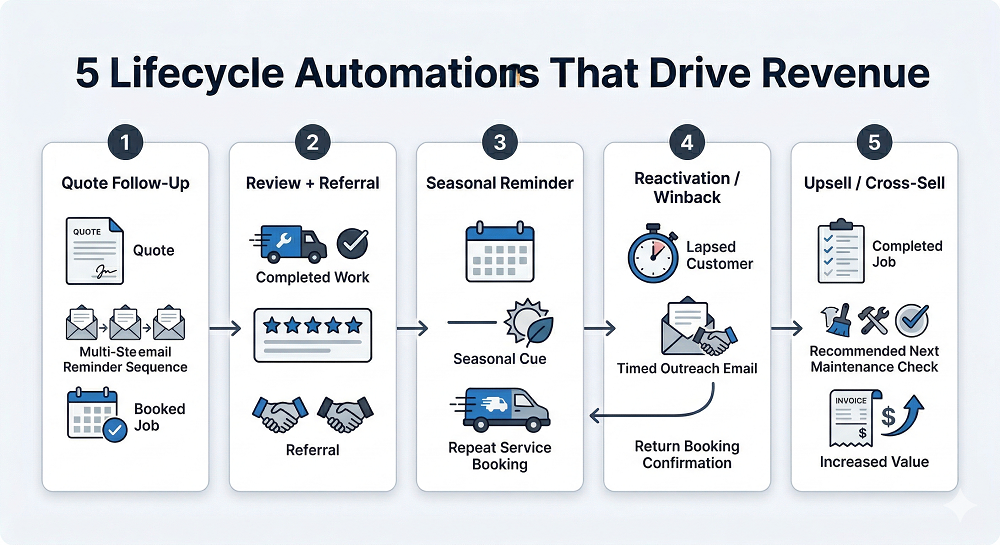
The 5 Automations Jobber Can't Do Well, But Klaviyo Can
Quote Follow-Up Sequence
A quote goes out. The customer gets busy. Your team assumes they're "thinking about it." A real sequence does more than send one reminder — it handles timing, addresses common objections, builds proof, creates urgency, and includes exit conditions. If the quote gets approved, the sequence stops. If not, it nudges without nagging. That alone can recover a meaningful amount of lost revenue.
Post-Service Review and Referral Flow
When the timing is right after job completion, you can ask for a review first, then follow with a referral ask, then present the next logical service if the customer had a strong experience. That flow works because the trust window is still open. Job completion isn't just a status update — it's a revenue trigger.
Seasonal Maintenance Reminders
Seasonal services don't run on a generic monthly schedule. They depend on service type, region, and last completed work. A maintenance reminder should feel like good timing, not a blast sent because someone remembered spring exists. That requires customer state and timing logic — both of which are difficult to maintain in Jobber's native email setup.
Reactivation and Win-Back
A landscaping customer who hasn't booked in eight months may be normal. An HVAC customer who has gone 18 months without service might be at serious risk. Different service categories have different lapse windows. A proper lifecycle system accounts for that and triggers reactivation before the customer is fully gone.
Upsell or Cross-Sell After Service
The best upsell timing is often right after a successful job, not randomly in a newsletter. But that only works when the message reflects what the customer just bought and what tends to come next. That's not hard to understand — it's just hard to execute well without the right system behind it.
Common Objections
"Isn't Klaviyo only for ecommerce?" No — that's the old mental model. Klaviyo is strong anywhere customer data, behavior, and timing matter. Service businesses have all three. They just usually have the data trapped in operational tools instead of feeding a lifecycle engine.
"We don't have enough contacts to justify it." You don't need a massive list. You need enough customer activity for timing and segmentation to matter. A smaller, well-targeted automation setup will usually outperform broad one-off sends anyway.
"We don't want to spam customers." Good — that's exactly why native email often stops working as you scale. Better systems don't automatically mean more email. They mean fewer irrelevant sends and more messages tied to real customer moments.
"We already text people manually." Manual texting can help close gaps, but it doesn't replace lifecycle automation. It just hides the fact that someone on the team is acting as the automation layer — and that doesn't scale.
"Our data in Jobber is messy." Probably. But messy data isn't a reason to avoid this — it's a reason to start small. Pick a few events, standardize a few properties, and build from there. You don't need a perfect account to launch two revenue-producing flows.
A 7-Day Way to Start
Days 1–2 — Pick your 3 revenue moments
Start with moments that already matter operationally:
- Quote sent
- Job completed
- Customer lapsed beyond expected window
That gives you a clean test bed without overcomplicating the launch.
Days 3–5 — Connect data and define segments
Build a few practical audiences:
- Recent quotes not yet booked
- Customers serviced in the last 14 days
- Customers with no job in the last 6–12 months, depending on service type
This is where most of the value starts showing up.
Days 6–7 — Launch the first 2 flows
Don't launch ten things. Launch the two flows most likely to prove the model:
- Quote follow-up
- Review and referral after job completion
Those are usually the fastest path to visible movement.
What to Read Next
If Jobber's limits are starting to feel obvious, the next move is to look at the bigger system:
- Jobber to Klaviyo: Turning Service Business Data Into Automated Revenue
- What You Can Automate When Jobber and Klaviyo Are Properly Connected
- The Most Overlooked Revenue Trigger in Jobber: Job Completion
- From Quote to Job to Invoice: Mapping the Jobber Customer Lifecycle
If you want to turn this into an implementation plan, a simple next asset would be a Jobber data → Klaviyo flow map showing which events, properties, and automations connect first.
FAQ
Can Jobber do automated marketing emails? Jobber can handle some email communication, and its Campaigns add-on allows basic automated sends. But it's not a full lifecycle marketing system. Once you need deeper segmentation, branching logic, reporting tied to revenue, and advanced personalization, you'll need something more flexible.
What are the limits of Jobber email campaigns? The biggest limits are segmentation depth, automation logic, customer state management, revenue-tied reporting, advanced personalization, branded sending domains, and list hygiene controls as volume grows.
Is Klaviyo worth it for service businesses? Yes — when the business has enough customer activity that timing, follow-up, and repeat service matter. The value usually comes from better lifecycle automation, not from sending more campaigns.
What Jobber data should sync into Klaviyo? Start with core events: quote sent, quote approved, job scheduled, job completed, invoice sent, and invoice paid. Then add useful properties like service type, last service date, location, total spend, and job count.
What are the first automations to build for a service business? Usually quote follow-up, post-service review and referral, seasonal reminders, reactivation for lapsed customers, and upsell or cross-sell after completed service.